

Motion explainer
Earned wage access, explained.
From request to payday — see how employees get paid early and how HR stays in control.
Earned wage accessMabilis. Ligtas. Maaasahan.
Access pay you’ve already earned this cut-off. One flat 5% fee, no interest — repaid on the next payroll. No platform fee for employers.
Take-home pay never drops below the regional minimum wage.

Request in the app. Money is sent as soon as HR approves.
Watch · 90 seconds
A quick visual explainer of how employees access earned pay and how HR stays in control.
From request to payday — see how employees get paid early and how HR stays in control.
For employees · How it works
No paperwork, no collateral. Opt in once — everything else happens in the PayBridge app.
Your limit comes only from pay you’ve already earned this cut-off.
For employers & HR
A real financial-wellness benefit: employees opt in, you approve, payroll recovers.
Features
Built from the same screens your employees and HR team will use every day.
For employees
Tag what each advance is for — rent, tuition, gamot — and mark it spent. Fewer impulse buys, less stress.
For HR
Set the advance cap (50–70% of earned pay), eligibility and approval rules once. PayBridge checks them on every request.
Your employer approves each request in-app, and you’re notified the moment it’s done.
For employeesMy Payroll shows what you’ve earned, what’s deducted, and why.
For employeesA heads-up before your payroll deduction, plus a receipt when it clears.
For employeesCompany-wide exposure, request status and repayments in one dashboard.
For HRPricing
You always see the full cost before anything is confirmed.
₱0platform fee
A 0.1%/day late charge applies only if the employer remits after 3 business days.
5%flat fee per advance
The fee is taken once, when the money is sent. Payroll then recovers only the amount you asked for.
| RequestAdvance requested | FeeProcessing fee (5%) | You getNet amount you receive | DeductedNext payroll deduction |
|---|---|---|---|
| ₱1,000 | ₱50 | ₱950 | ₱1,000 |
| ₱3,000 | ₱150 | ₱2,850 | ₱3,000 |
| ₱5,000 | ₱250 | ₱4,750 | ₱5,000 |
| ₱10,000 | ₱500 | ₱9,500 | ₱10,000 |
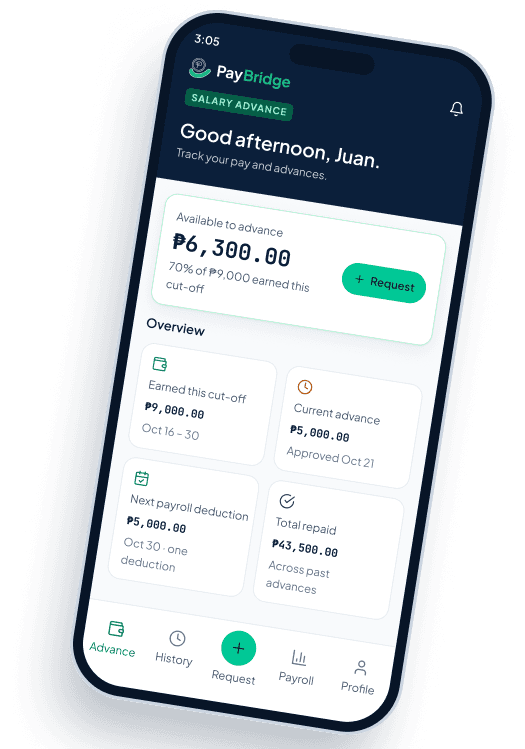
PayBridge Mobile
See your earned pay, upcoming deductions and advance history — wherever you are.
Free to download · For employees of enrolled companies.
Built-in safeguards
So an advance helps today without hurting next payday.
You’re a current employee on your company’s eligible list.
Never more than wages earned this cut-off, less SSS, PhilHealth, Pag-IBIG and other existing deductions.
Blocked if your net pay would fall below the regional minimum wage.
Your employer approves each request in-platform within 2 business days.
You see the amount, 5% fee, net amount and deduction before confirming.
Testimonial 1 of 3
“Since we introduced PayBridge, our employees feel mas kampante. They know may safe salary advance option sila kapag kailangan.”
From the blog
Practical guides on budgeting, borrowing wisely and staying safe from scams.

Small daily purchases can add up quickly. Learn how seemingly harmless expenses can affect your monthly finances.
Aug 24, 2026 · 1 min read
FAQ
Can’t find what you need? Our team replies within one business day.
Yes. There’s no platform fee for employers. Employees pay a flat 5% fee per advance, taken from the amount they receive and shown before they confirm.
PayBridge is designed for established Philippine employers using bank payroll, with eligibility based on operating history and regular employee count.
Employers set a cap of 50–70% of earned pay. Existing deductions and minimum take-home pay safeguards can lower the available amount.
The requested amount is recovered once from the employee’s next payroll. The 5% fee is taken before the advance is sent.
Employers review requests in-platform and are expected to approve eligible requests within 2 business days.
PayBridge uses encrypted systems and limits payroll data access to the information needed for eligibility, approvals and repayment.
No platform fee for your company. We’ll help you check eligibility, set limits and invite your team.